A look inside
This is the actual dental clinic app.
Not a mockup and not a sales video — real screens from a working clinic we set up for this page. The patients are invented; everything else is exactly what you get.
Your patients
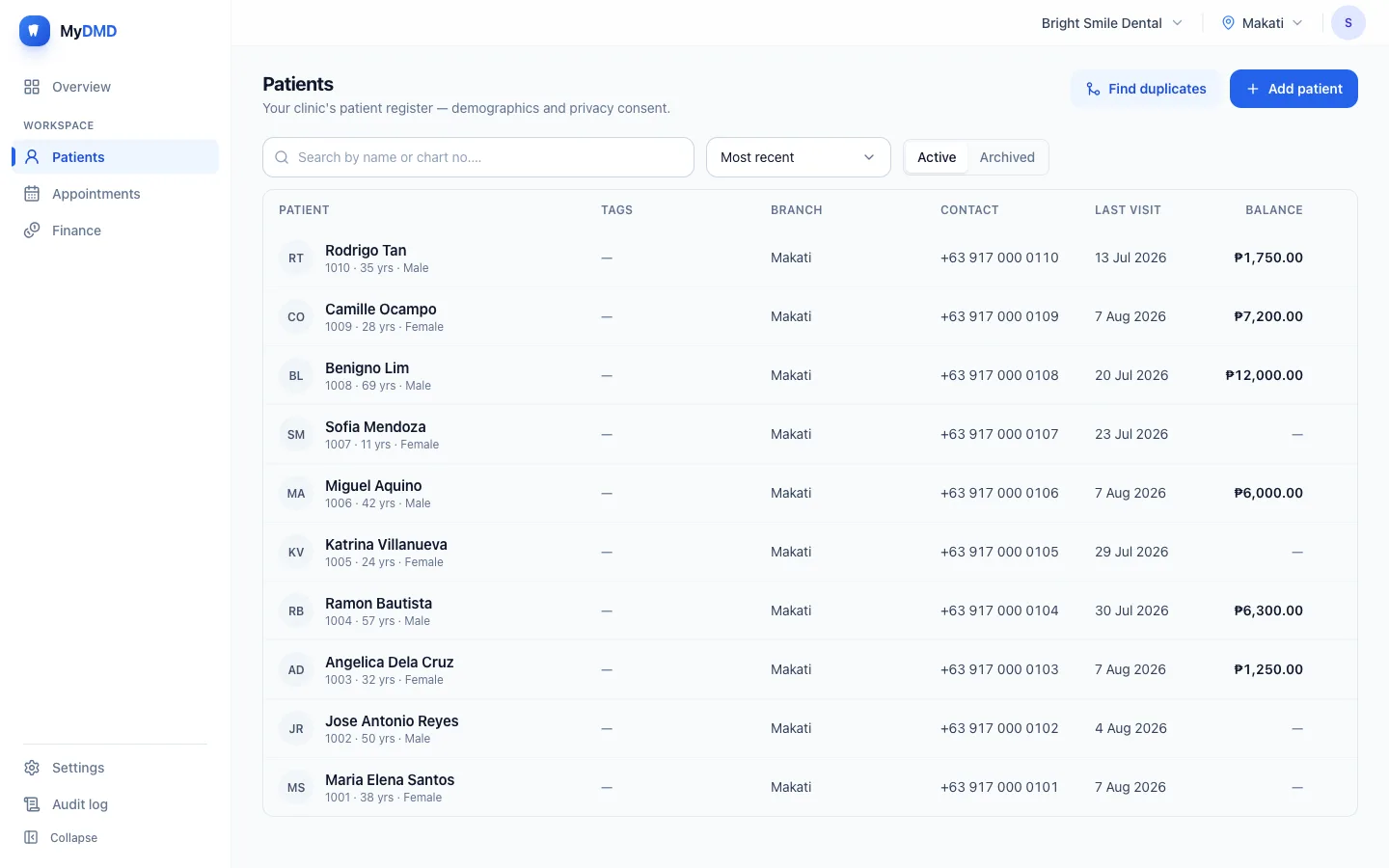
The register, and what everyone owes you
Search by name or chart number, filter to a branch, and see the outstanding balance on every row without opening anyone. Archived patients stay out of your way but are never deleted.
- Chart numbers, ages and contact details at a glance
- A balance that always matches the payments behind it
- A duplicate finder, because the same person gets added twice
- Consent recorded before a record can be saved at all
Your day
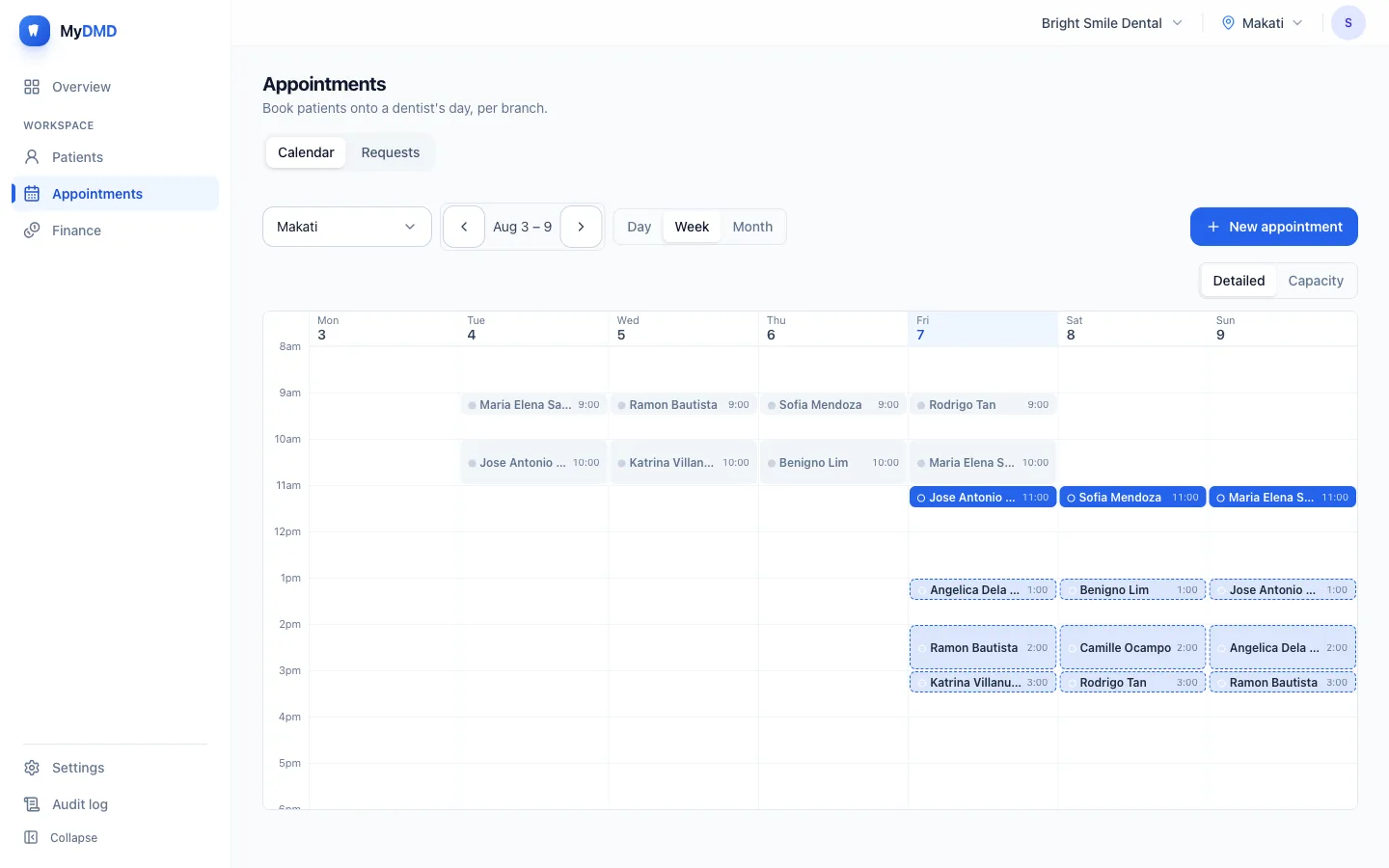
A calendar that knows who works when
Day, week and month, per branch, per dentist. Drag an appointment to move it. Working hours and clinic closures are built in, so booking outside them warns you at the time rather than letting you find out on the day — a warning you can override, because sometimes you do squeeze someone in.
- Scheduled, arrived, in chair, completed — plus cancelled and no-show, so the front desk can see the room
- A warning before two patients take the same slot — or a refusal, if you prefer
- Email confirmations and reminders, with the patient confirming from the email
- A public booking page whose requests wait in an inbox — never auto-confirmed
Your money
Every peso, with a name on it
Income, expenses and transfers between your own accounts, filtered to today, this week, or any range you pick. Each payment points at the patient it came from and the account it landed in, so the drawer can be counted against the app rather than argued with.
- Payment accounts per branch, or shared across the clinic
- Installments and part-payments, with overpayments held as patient credit
- Voiding leaves a trace instead of erasing a row
- Reports you can read without exporting anything
Your supplies
Know before you run out of gloves
One list of what your clinic stocks, and each branch ticks the things it actually carries and sets its own minimum. Nobody logs anything mid-appointment — you count the stockroom when it suits you, on a phone, and the order list writes itself: what’s short, grouped by supplier, ready to send.
Inventory comes with Basic and Pro, and with your 14-day trial.
How Inventory works →Your scans
Show the patient their own teeth, in 3D
Upload the arches from your intraoral scanner to the patient’s record — PLY or STL — and turn them in 3D chairside, with front, left, right and occlusal views a tap away.
Digital impressions comes with Pro, and with your 14-day trial.
See it turn →Day one
You’re not left staring at an empty app
A new clinic gets a checklist, not a blank screen: add your team, set working hours, price your procedures, add your payment accounts. There’s a starter list of 34 common procedures if you’d rather type fees than type names.
Four steps are required and the rest are optional — the app tells you which is which, and stops nagging once you’re done.
The chart
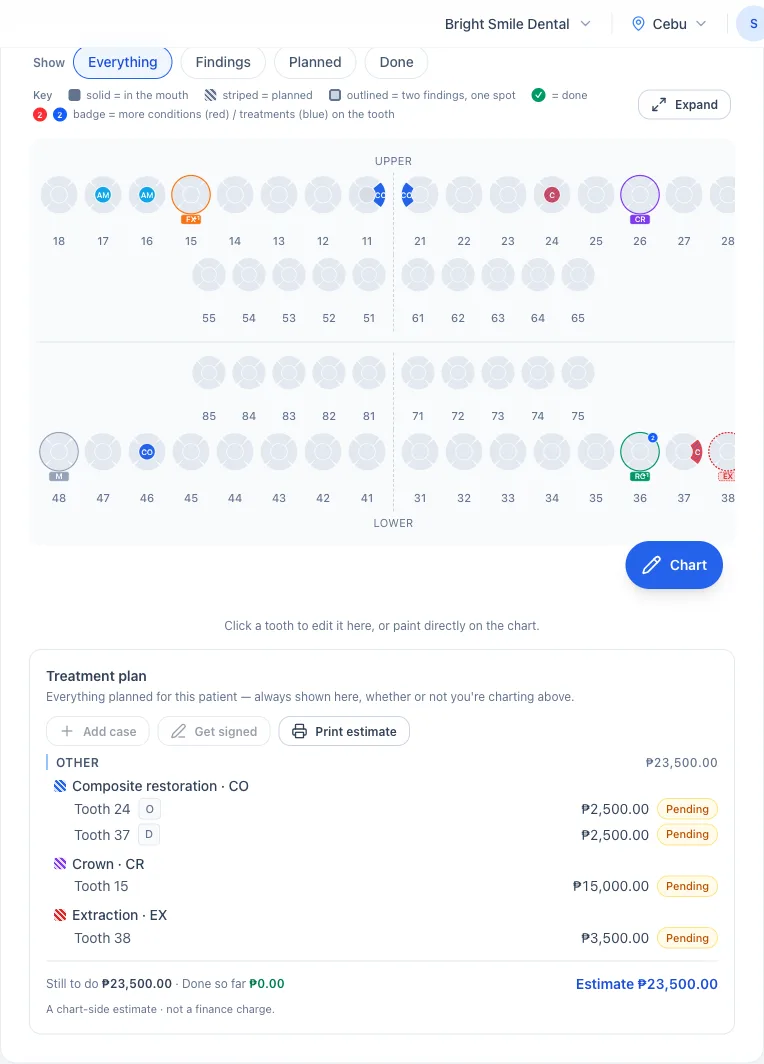
One chart for the whole mouth
An FDI odontogram with adult and baby teeth together — mixed dentition is the normal case in a family practice, and splitting it across two views is how a permanent molar gets charted as a deciduous one. Five surfaces per tooth, with what’s already in the mouth drawn solid and what’s planned drawn striped.
The plan totals underneath as an estimate you can print for the patient — and it is only an estimate. Nothing is charged until a procedure is completed on a visit, which is why the chart can read ₱23,500 while the ledger reads nothing at all.
The rest of a patient’s record
Everything clinical sits with the patient, so it’s all in one place when they’re in the chair.
Medical history
The full questionnaire, with allergies and medications in their own fields. A life-threatening flag raises a medical alert that follows the patient onto every screen you open them on.
Progress notes
Notes and money stay separate. A note records what you did and what you plan; its next-visit date can book the follow-up without retyping anything.
Photos and x-rays
Drag and drop from a computer or capture straight from a phone. X-rays and PDFs are kept exactly as received, and you can tag one to a tooth, with a 30-day trash you can restore from.
Forms you can sign on screen
Fill a template, sign with a finger, and lock it. The signed PDF carries your letterhead, a reference number and a seal, so an altered copy can be spotted.
Prescriptions
Kept with the patient’s other documents, so the history stays whole. Generic name first as RA 6675 requires, with your PRC and PTR numbers, S2 for controlled drugs, and allergy warnings drawn from the patient’s own history.
Lab cases
Track each case from sent to back from the lab, against labs you set up once. Turnaround days fill in the due date, late cases are flagged, and the job order and package label print from the case.
More than one location
One clinic, many branches, each with its own hours, staff and payment accounts. A branch’s team works with that branch’s patients. If someone from another branch walks in, your staff can find them by name rather than starting a second record — and bringing them across is a deliberate step that gets recorded.
Running several branches →Built to the Data Privacy Act
Consent is recorded before a patient record can be saved. Patients are archived, never erased. Every change, and every file opened, is written down with who did it and when — and you can read that yourself.
Data privacy in MyDMD →The best look is your own clinic in it
14 days, no card, nothing charged when it ends. Set it up with your real procedures and prices and see whether it fits how you work.
Want to see how setup goes first? Read the step-by-step guides →